

Web hosting is a service that allows individuals and businesses to make their websites accessible on the internet. It works by renting space on a server—a powerful computer that stays connected to the internet 24/7—where your website’s files are stored. These files include HTML pages, images, videos, databases, and code that make your website function and appear the way it does.
Without web hosting, your website would only exist on your personal computer and would not be visible to anyone else online.
In simple terms, think of web hosting like renting an apartment for your website. You design and build the website (the furniture and décor), but the hosting provider gives it a permanent place to live and keeps everything running day and night.
How Does Web Hosting Work?
The process of web hosting happens behind the scenes, but it follows a clear sequence.
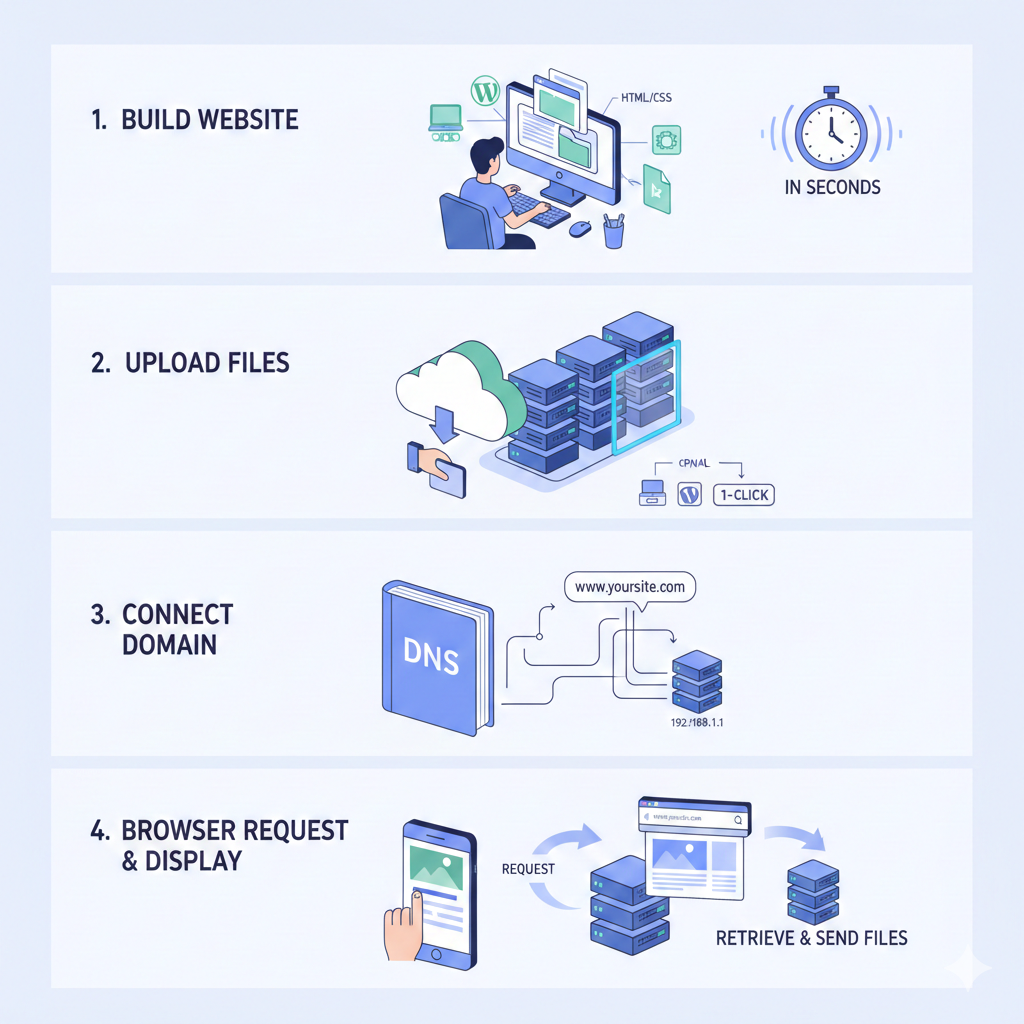
First, you create or build a website. This can be done using platforms like WordPress, coding languages such as HTML and CSS, or drag-and-drop website builders. At this stage, all your site’s content exists as files on your computer.
Next, you sign up with a hosting provider. The provider allocates space on one of their servers for your website. You then upload your files using tools such as FTP, a hosting control panel like cPanel, or a one-click installer for platforms like WordPress.
After that, your domain name is connected to the server. Your domain (for example, www.yoursite.com) is linked to the server’s IP address through the Domain Name System (DNS). DNS works like a phonebook, translating your website name into the server’s actual location on the internet.
When a visitor types your domain name into their browser or clicks a link, the browser sends a request to the server. The server then retrieves the correct files and sends them back to the visitor’s browser, which displays the webpage.
All of this happens in seconds.
Ongoing Hosting Maintenance
A hosting provider doesn’t just store your files—they also handle ongoing maintenance. This includes keeping the server running, applying security updates, managing backups, and ensuring high uptime, usually aiming for 99.9% or higher.
Most hosting plans also include useful features such as SSL certificates (which enable HTTPS security), email hosting, and Content Delivery Networks (CDNs) that help your site load faster for visitors around the world.
With good hosting, most websites load in under three seconds. Poor hosting, on the other hand, often leads to slow load times, higher bounce rates, and weaker search engine rankings.
Types of Web Hosting
There are several types of web hosting, each designed for different needs and budgets.
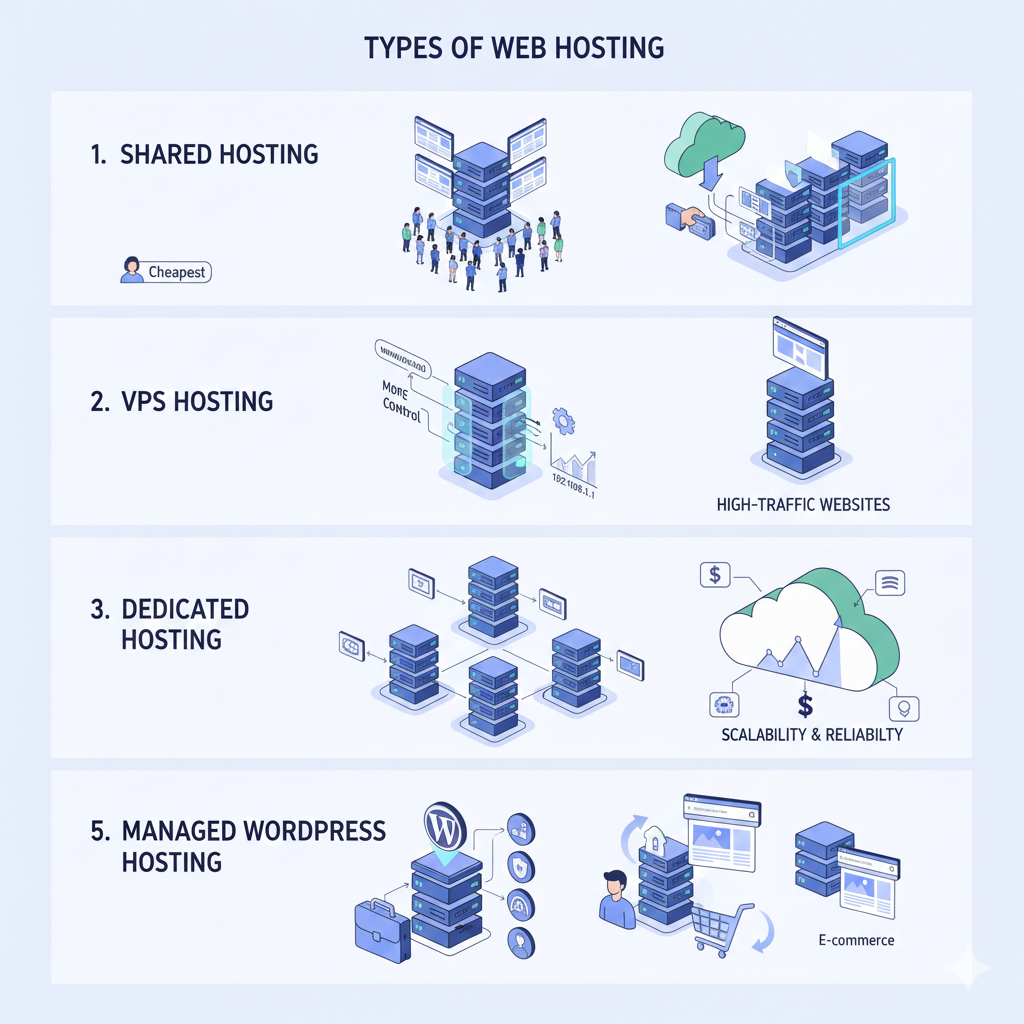
Shared Hosting is the cheapest option. Multiple websites share the same server and resources, making it ideal for beginners, personal blogs, and small websites.
VPS (Virtual Private Server) Hosting gives you a dedicated virtual portion of a server. It offers more control and better performance than shared hosting, making it suitable for growing websites.
Dedicated Hosting provides an entire server for a single website. This option is powerful but expensive and is usually reserved for high-traffic or resource-intensive websites.
Cloud Hosting uses multiple interconnected servers instead of just one. This setup improves reliability and scalability, as traffic spikes can be handled more easily with minimal downtime.
Managed WordPress Hosting is specifically optimized for WordPress websites. It typically includes automatic updates, enhanced security, and performance optimizations.
Reseller and Other Specialized Hosting options are designed for agencies, developers, or specific use cases such as e-commerce websites.
Best Web Hosting Providers in Late 2025
Based on recent expert reviews from sources such as CNET, PCMag, WebsitePlanet, Cybernews, and TechRadar, hosting providers are evaluated using performance tests, uptime guarantees, features, customer support, and overall value.
| Rank | Provider | Best For | Starting Price (Shared / Entry) | Key Strengths | Uptime Guarantee | Drawbacks |
|---|---|---|---|---|---|---|
| 1 | Hostinger | Best value & performance | ~$3/mo | Fast LiteSpeed servers, AI tools, free domain & migration, great for WordPress | 99.9% | Live chat only support |
| 2 | SiteGround | Overall reliability & support | ~$3/mo | Excellent customer service, optimized for WordPress & e-commerce, strong security | 99.9% | Higher renewal prices |
| 3 | IONOS | Budget & security features | ~$1/mo | Very cheap plans, strong security, good for beginners & developers | 99.9% | Limited advanced features |
| 4 | Bluehost | WordPress beginners | ~$3/mo | Official WordPress recommendation, easy setup, free domain | 99.9% | Mixed support reviews |
| 5 | DreamHost | Unlimited features & privacy | ~$3/mo | Unlimited storage & bandwidth, free domain & privacy, eco-friendly | 100% (with credits) | No phone support |
| 6 | GreenGeeks | Eco-friendly hosting | ~$3/mo | Carbon-neutral hosting, fast performance, good support | 99.9% | Slightly higher renewals |
| 7 | InMotion Hosting | Business & scalability | ~$3–5/mo | Free migrations, US/EU servers, strong VPS options | 99.9% | Can be pricier |
| 8 | HostArmada | Speed & cloud stability | ~$3/mo | Cloud-based hosting, fast loading, good support | 99.9% | Newer provider |
| 9 | Kinsta | Premium managed WordPress | ~$30/mo (no shared) | Google Cloud powered, ultra-fast, top-tier security | 99.9% | Expensive, WordPress-only |
| 10 | Liquid Web / Nexcess | High-traffic & enterprise | ~$20+/mo | Managed VPS & dedicated servers, excellent performance & support | 99.99% | Not beginner- or budget-friendly |
Tips for Choosing
- For a new blog/personal site → Start with Hostinger or SiteGround.
- For e-commerce/WordPress → Bluehost or SiteGround.
- For speed on a budget → Hostinger.
- Always look for free SSL, backups, migrations, and a money-back guarantee (30–97 days common).
- Avoid very cheap “unlimited” plans that oversell servers—check reviews for real uptime/speed.
Most hosting companies advertise introductory prices that apply for the first one to four years. Renewal prices are usually higher, so it’s always important to check current deals and long-term costs before committing.
Avail 20% off Hostinger with our official partner discount below.
To get started with your own website, you can use our partner link below to avail a 20% discount on Hostinger. https://hostinger.pk?REFERRALCODE=Ludicarc